Showing posts with label YouTube. Show all posts

Google's Video Duration Experiment

This is a strange experiment: Google tests adding the duration of a video to the search result title. I've noticed this experiment by searching for [zero 7 in the waiting line]. Google seems to change the title only for YouTube videos, but not for all of them.


The duration of the video is already displayed on top of the thumbnail, so this is redundant.

YouTube Tweaks Experimental Center-Aligned UI

YouTube continues to tweak the center-aligned UI experiment. The latest version includes a new upload button, a refined guide sidebar with new icons and "more" drop-downs for playlists and subscriptions, a list of recommended channels and probably other features.


The "guide" sidebar is displayed by default only if there's enough room. If there isn't, the sidebar is hidden and you need to click "guide" to see your playlists, subscriptions, video history and more.


The layout still uses cards and it's center-aligned.


Here's how you can enable the experimental interface. If you use Chrome, Firefox, Opera, Safari or Internet Explorer 8+:

1. open youtube.com in a new tab

2. load your browser's developer console:

* Chrome or Opera 15+ - press Ctrl+Shift+J for Windows/Linux/ChromeOS or Command-Option-J for Mac

* Firefox - press Ctrl+Shift+K for Windows/Linux or Command-Option-K for Mac

* Internet Explorer 8+ - press F12 and select the "Console" tab

* Safari 6 - if you haven't enabled the Develop menu, open Preferences from the Safari menu, go to the Advanced tab and check "Show Develop menu in menu bar". Close Preferences and then press Command-Option-C to show the console.

* Opera 12 - press Ctrl+Shift+I for Windows/Linux or Command-Option-I for Mac, then click "Console".

3. paste the following code which changes a YouTube cookie:

document.cookie="VISITOR_INFO1_LIVE=rkZGzYxfbLQ; path=/; domain=.youtube.com";window.location.reload();

4. press Enter and close the console.

To go back to the regular interface, use the same instructions, but replace the code from step 3 with this one:

document.cookie="VISITOR_INFO1_LIVE=; path=/; domain=.youtube.com";window.location.reload();

{ Thanks, Florian K. }

YouTube's Player, Back to Simple Buttons?

Back in September, YouTube's player grouped controls for annotations, player size and video quality. A few weeks ago, the "large player" button has been removed from the drop-down and brought back to its original position, next to the "full screen" button.


If the video doesn't have annotations and you use the Flash player, you'll even see the video quality drop-down without an additional click:

YouTube Easter Egg for Doge Meme

"Doge is a slang term for 'dog' that is primarily associated with pictures of Shiba Inus (nicknamed 'Shibe') and internal monologue captions on Tumblr. These photos may be photoshopped to change the dog's face or captioned with interior monologues in Comic Sans font," informs KnowYourMeme.

YouTube has an Easter Egg that changes the search results page for [doge meme]: colorful text, Comic Sans, much wow, so hip, help plz.


{ via Phandroid, thanks Sushubh }

YouTube's Follow Back in Google+

Emanuele Bartolomucci spotted a new YouTube feature: when you're watching a video from a channel associated with a page that follows you in Google+, you get this message: "X added you on Google+. Follow back for exclusive updates!"


I wasn't able to trigger this feature, so it's probably an experiment. It's also a sign that YouTube will integrate more with Google+.

{ Thanks, Emanuele. }

YouTube Tests Channel Cards

After adding music cards and testing cards for shows, YouTube experiments with cards for channels. They're displayed in the right sidebar of the search results page and show the latest videos from the channel and some of its playlists.

Here's an example for Google Chrome. The channel is still included in the list of search results.


Here's how you can enable the experimental feature. If you use Chrome, Firefox, Opera, Safari or Internet Explorer 8+:

1. open youtube.com in a new tab

2. load your browser's developer console:

* Chrome or Opera 15+ - press Ctrl+Shift+J for Windows/Linux/ChromeOS or Command-Option-J for Mac

* Firefox - press Ctrl+Shift+K for Windows/Linux or Command-Option-K for Mac

* Internet Explorer 8+ - press F12 and select the "Console" tab

* Safari 6 - if you haven't enabled the Develop menu, open Preferences from the Safari menu, go to the Advanced tab and check "Show Develop menu in menu bar". Close Preferences and then press Command-Option-C to show the console.

* Opera 12 - press Ctrl+Shift+I for Windows/Linux or Command-Option-I for Mac, then click "Console".

3. paste the following code which changes a YouTube cookie:

document.cookie="VISITOR_INFO1_LIVE=2IS0PWox26Q; path=/; domain=.youtube.com";window.location.reload();

4. press Enter and close the console.

Some examples of searches: [google], [apple], [comedy central].

To go back to the regular interface, use the same instructions, but replace the code from step 3 with this one:

document.cookie="VISITOR_INFO1_LIVE=; path=/; domain=.youtube.com";window.location.reload();

{ via Rubén. }

Blue YouTube

I like blue, so I was pleasantly surprised to see that YouTube made some UI elements blue (#2793e6): the like button and the line below the number of views. Maybe someone was unhappy that Android KitKat removed all the blue icons and decided to compensate in other ways or maybe it's an attempt to calm YouTube users and make them stop posting silly comments.


YouTube Adds Google+ Comments

YouTube started to roll out the new commenting system powered by Google+.

Here are the new features:

* Smarter sorting: see more from people you know
* Meaningful conversations: new threaded format and +mentions encourage discussion.
* Comments appear from both YouTube and Google+.


"Comments you care about show first. You'll see comments at the top of the list from people in your Google+ Circles, from creators, and from popular personalities. Comments with many likes and replies will rank highly as well. Choose Newest First to see the most recent comments instead. Replies are threaded (like Gmail) so you can easily follow conversations. Google+ posts that link to videos or channels will also appear as comments on YouTube, marked 'via Google+'. You can report any comment for spam or abuse. If you're a creator, you can also use comment moderation tools for comments on your videos or your channels," informs Google.

"By default, your comment will be public on YouTube. You can also have a more private discussion by sharing your comment just to specific people or Google+ circles. Click Edit to enter the people and circles you want. On mobile apps, tap the field that shows the visibility of your post. You can also share your comment as a post on Google+. Only the people you choose will be able to see the comment on Google+."


You can also add rich text using the old Google Talk tricks: *bold*, _italic_, -strikethrough-.

The new commenting system is already enabled for YouTube channels. Here's a random YouTube channel that uses it.

YouTube Drops Support for 1080p Streams in the Regular HTML5 Player

I've mentioned in the previous post about Media Source Extensions and YouTube's HTML5 player. For now, only Chrome, Opera and IE11 for Windows 8 support Media Source Extensions. If you're using Firefox, Safari or an old version of IE, you're out of luck.

Why is this important? YouTube switched to adaptive streams in the Flash player and now does the same thing for the HTML5 player, but this requires Media Source Extensions. The adaptive DASH player uses separate chunked streams for audio and video, so that YouTube can switch the stream to a lower or higher bit rate, depending on the network bandwidth.

A few days ago, YouTube removed the non-DASH streams for 480p and 1080p. This means that you'll no longer be able to watch 1080p videos in YouTube's HTML5 player if you use Firefox or Safari. Here's an example of video that includes the 480p and 1080p options in the Flash player and the DASH HTML5 player, but not the regular HTML5 player.

Firefox screenshot:


Chrome screenshot:


This change affects desktop browsers and mobile browsers, third-party mobile YouTube players, as well as the apps and extensions that download YouTube videos and break YouTube's terms of use. You're not affected if you use the Flash player, the HTML5 player in Chrome, Opera and IE11 or YouTube's mobile apps.

Maybe this was one of the reasons why YouTube decided to make the video quality drop-down less visible.

Update: Mozilla plans to add support for Media Source Extensions. "Timeline wise we are hoping to support enough of the spec to support the YouTube production player by the end of the year but will need to collaborate with YouTube to ensure that we're focusing on the right things."

YouTube Shows if Your Browser Supports Media Source Extensions

YouTube has recently updated the HTML5 player's page and now shows if your browser supports Media Source Extensions for H.264 or WebM VP9. I loaded the page in various browsers and Chrome is the only browser that supports both containers and Media Source Extensions. Internet Explorer 11 also supports Media Source Extensions, but you need to install a Google software to play WebM videos in IE.


The W3C draft explains that this "extends HTMLMediaElement to allow JavaScript to generate media streams for playback. Allowing JavaScript to generate streams facilitates a variety of use cases like adaptive streaming and time shifting live streams."

If your browser supports Media Source Extensions, YouTube's HTML5 player can use the adaptive streaming feature that's already available in the Flash player. You can also right-click the player, select "stats for nerds" and see if you can find "DASH: yes" - this means that YouTube uses adaptive streaming, slices videos and only loads the slices when they are needed. Here's a screenshot from IE11 in Windows 8.1:


"IE11 introduces support for MPEG-DASH media streaming through HTML5 Media Source Extensions (MSE). MSE extends the video and audio elements that you can dynamically change for a media stream without using plug-ins. This gives you such things as adaptive media streaming, live streaming, splicing videos, and video editing. This feature is not supported in IE11 on Windows 7," informs Microsoft.

With the introduction of Media Source Extensions and Encrypted Media Extensions, sites like Netflix or Hulu can switch to HTML5 players and no longer rely on plug-ins or separate apps. The downside for users is that it will no longer be easy to download videos from HTML5 players, since the DRM code will generate streams dynamically.

YouTube Cards for Shows

YouTube tests a new interface for the shows card that looks just like the music card. It displays a large thumbnail, a list of seasons and episodes when you search for the name of the show.

"A YouTube show is an episodic or consistently themed web series consisting of a cast along with one or various topics, styles, and/or storylines. A viewer can subscribe directly to a show as opposed to an entire channel. All episodes in a show are created by a single partner, organized into seasons and delivered consistently. Episodes may be ad-supported, purchased by rental or not monetized at all," explains YouTube.


Here's the existing interface:


Here's how you can enable the experimental feature. If you use Chrome, Firefox, Opera, Safari or Internet Explorer 8+:

1. open youtube.com in a new tab

2. load your browser's developer console:

* Chrome or Opera 15+ - press Ctrl+Shift+J for Windows/Linux/ChromeOS or Command-Option-J for Mac

* Firefox - press Ctrl+Shift+K for Windows/Linux or Command-Option-K for Mac

* Internet Explorer 8+ - press F12 and select the "Console" tab

* Safari 6 - if you haven't enabled the Develop menu, open Preferences from the Safari menu, go to the Advanced tab and check "Show Develop menu in menu bar". Close Preferences and then press Command-Option-C to show the console.

* Opera 12 - press Ctrl+Shift+I for Windows/Linux or Command-Option-I for Mac, then click "Console".

3. paste the following code which changes a YouTube cookie:

document.cookie="VISITOR_INFO1_LIVE=c1OXNGmJ090; path=/; domain=.youtube.com";window.location.reload();

4. press Enter and close the console.

To go back to the regular interface, use the same instructions, but replace the code from step 3 with this one:

document.cookie="VISITOR_INFO1_LIVE=; path=/; domain=.youtube.com";window.location.reload();

Some examples of searches: [lifehacker], [designers at work], [classical music], [gta].

{ Thanks, Rubén. }

YouTube Updates Center-Aligned UI, Adds Carousel

YouTube's experimental interface now uses carousels on the homepage, so it can show more videos from a channel. Video thumbnails are also much bigger. The regular interface also uses carousels, but only when you are signed in.

It's another version of the center-aligned layout, which uses a persistent header, a guide sidebar that's visible only when you click "Guide" and a card-style interface.


Here's how you can enable the experimental feature. If you use Chrome, Firefox, Opera, Safari or Internet Explorer 8+:

1. open youtube.com in a new tab

2. load your browser's developer console:

* Chrome or Opera 15+ - press Ctrl+Shift+J for Windows/Linux/ChromeOS or Command-Option-J for Mac

* Firefox - press Ctrl+Shift+K for Windows/Linux or Command-Option-K for Mac

* Internet Explorer 8+ - press F12 and select the "Console" tab

* Safari 6 - if you haven't enabled the Develop menu, open Preferences from the Safari menu, go to the Advanced tab and check "Show Develop menu in menu bar". Close Preferences and then press Command-Option-C to show the console.

* Opera 12 - press Ctrl+Shift+I for Windows/Linux or Command-Option-I for Mac, then click "Console".

3. paste the following code which changes a YouTube cookie:

document.cookie="VISITOR_INFO1_LIVE=lnq3tYnrDNU; path=/; domain=.youtube.com";window.location.reload();

4. press Enter and close the console.

To go back to the regular interface, use the same instructions, but replace the code from step 3 with this one:

document.cookie="VISITOR_INFO1_LIVE=; path=/; domain=.youtube.com";window.location.reload();

{ Thanks, Rubén and Ramona Brown. }

Force YouTube to Use the HTML5 Player

YouTube's HTML5 player is great, but it's not enabled for all the videos. Even if you go to youtube.com/html5 and join the HTML5 trial, you'll find a lot of videos that use the Flash player. "Some videos with ads are not yet supported (they will play in the Flash player)," mentions the site.

There's a simple Greasemonkey script that forces YouTube to use the HTML5 player for almost all the videos you watch at youtube.com. You need to install Greasemonkey if you use Firefox or Tampermonkey if you use Chrome, then click the "Install" button here.

[Update (Octomber 3rd, 2013): For Chrome, use the old version from Sept 23.]

The script works better in Firefox. If you install the script in Chrome, it will disable the new Ajax interface, but everything else seems to work well.


Here's a video you can use to test the script. Please note that the script doesn't work for embedded videos.

YouTube Comments Powered by Google+

Just like Blogger, YouTube will switch to Google+ comments, but it won't be optional. YouTube already asks users to connect their channels with Google+.

"When it comes to the conversations happening on YouTube, recent does not necessarily mean relevant. So, comments will soon become conversations that matter to you. In the coming months, comments from people you care about will rise up where you can see them, while new tools will help video creators moderate conversations for welcome and unwelcome voices. Starting this week, you'll see the new YouTube comments powered by Google+ on your channel discussion tab. This update will come to comments on all videos later this year, as we bring you more ways to connect with familiar faces on YouTube," informs the YouTube blog.

Here's a screenshot that shows the new commenting interface:


YouTube's comments are rarely insightful or useful. There's a lot of spam, trolling and hate speech. Switching from anonymous aliases to Google+ profiles might improve the quality of comments.

"You'll see posts at the top of the list from the video's creator, popular personalities, engaged discussions about the video, and people in your Google+ Circles. You can choose to start a conversation so that it is seen by everyone on YouTube and Google+, only people in your Circles or just your bestie. Like Gmail, replies are threaded so you can easily follow conversations. You have new tools to review comments before they're posted, block certain words or save time by auto-approving comments from certain fans. These can help you spend less time moderating, and more time sharing videos and connecting with your fans."

Blogger's commenting system powered by Google+ has been disappointing so far. Google doesn't offer comment moderation tools in the Blogger interface and Google doesn't do a good job at detecting spam or at ranking comments. There's a lot of noise and Google even shows a list of people who +1'd the post.

{ Thanks, Adrià. }

YouTube Fans

If you have a popular YouTube channels with more than 5,000 subscribers, you'll be able to find more about the people who love your videos. "The Fans page shows a list of some of your most engaged and most influential fans, based on their public interaction with your YouTube channel. By default, the list is sorted by a combination of subscriber count and engagement level, but you can also sort by either factor on its own," informs YouTube.


"For each person on the list, you can see how many subscribers they have, how engaged they are with your channel, an example comment they've left on one of your videos, and how long they've been a subscriber. Engagement is based on that person's public interactions with your channel, such as commenting, liking, subscribing, etc."

You can also create a Google+ circle for your top fans in the insights page. "See what other videos and channels they're into, and reach out via Google+ to ask a question, start a conversation, share behind-the-scenes photos, or upload a private video just for them."

{ Thanks, Stefan. }

YouTube's Mobile Apps to Add Download Feature

The YouTube Creator blog announced that YouTube's mobile apps will add a feature that lets you download videos so you can watch them offline.

"Later this year we'll launch a new feature on YouTube's mobile apps that will help you reach fans -- even when they're not connected to the Internet. This upcoming feature will allow people to add videos to their device to watch for a short period when an Internet connection is unavailable."

AllThingsD reports that this feature will be available next month and that the downloaded videos will be available for 48 hours. "Next month, Google's video site will let viewers save clips on their phones and other mobile devices for up to 48 hours, so they can watch them when they're not online. The videos will still be free, and Google will run ads on the clips, which will be available via its mobile apps."

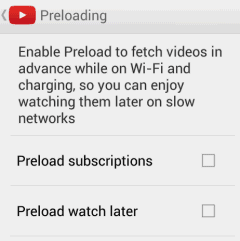
YouTube's Android app already has a preloading feature for subscriptions and the "watch later" playlist, but this feature has a catch: you need to be online when starting to play a video. This makes the feature less useful.


A few years ago, YouTube experimented with downloads for some partner channels. Now it only lets you download your videos. There are a lot of third-party applications and extensions for downloading YouTube videos, but you won't find them in the Play Store or the Chrome Web Store because they break YouTube's terms of use.

YouTube Tests Improved Center-Aligned Interface

Now that many of the YouTube experiments are publicly available, it's time for something new. YouTube tests a new version of the center-aligned layout. The sidebar looks better, but it's still hidden by default. The YouTube homepage has two tabs for "What to watch" and "My subscriptions", while the header is now persistent.


Here's a video that shows a slightly different version of the experiment:


Here's how you can enable the experimental feature. If you use Chrome, Firefox, Opera, Safari or Internet Explorer 8+:

1. open youtube.com in a new tab

2. load your browser's developer console:

* Chrome or Opera 15+ - press Ctrl+Shift+J for Windows/Linux/ChromeOS or Command-Option-J for Mac

* Firefox - press Ctrl+Shift+K for Windows/Linux or Command-Option-K for Mac

* Opera 12 - press Ctrl+Shift+I for Windows/Linux or Command-Option-I for Mac, then click "Console"

* Safari - check this article

* Internet Explorer - press F12 and select the "Console" tab.

3. paste the following code which changes a YouTube cookie:

document.cookie="VISITOR_INFO1_LIVE=Gapj9bz_H8M; path=/; domain=.youtube.com";window.location.reload();

4. press Enter and close the console.

To go back to the regular interface, use the same instructions, but replace the code from step 3 with this one:

document.cookie="VISITOR_INFO1_LIVE=; path=/; domain=.youtube.com";window.location.reload();

{ Thanks, Sushubh and Rubén. }

YouTube Music Cards

A few weeks ago, I posted about a YouTube experiment that adds bigger cards for music artists. Search for Röyksopp, Daft Punk or any other popular artist and you'll see a Knowledge Graph-like sidebar with a list of top tracks, albums and related artists. Click any track and you'll start a playlist with a lot of other songs from the same artist. Click an album and you'll be able to listen to all the songs from the album.


What else is there? You can also click "top tracks" to start the playlist automatically generated by YouTube. Click the artist's name to visit the topic channel created by YouTube (there's no topic channel for Röyksopp, but there's one for Daft Punk).


YouTube's Compact Controls

A few weeks ago, YouTube tested a feature that grouped controls like annotations, video quality and player size. This feature is now publicly available.

"Notice something a little different about YouTube videos? We've just launched a new version of the player with improved caption controls and a cleaner look. If you're looking for the annotations switch, just click the gear button - you'll find size and quality controls there too," informs YouTube.


The gear button was previously used for the quality dropdown. This change makes the player less cluttered and makes the video quality dropdown less visible. When YouTube removes it, fewer people will complain.

Now it's hard to tell if a video has annotations without clicking the settings button. Each of the settings require an extra click.

{ Thanks, Tolis and Sushubh. }

YouTube Channels Integrate With Google+

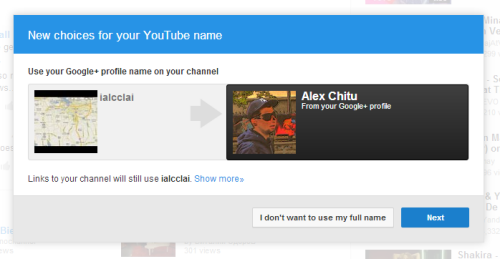
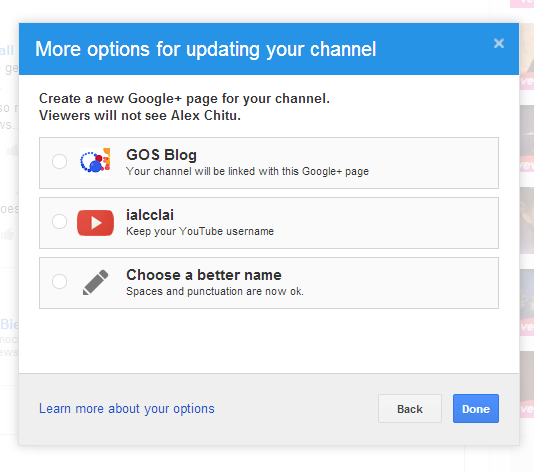
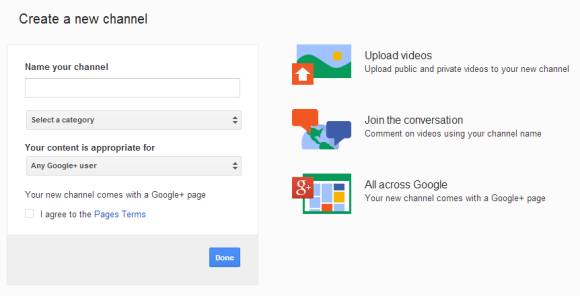
If you haven't integrated your YouTube channel with Google+, YouTube offers more options. You can connect the channel to your Google+ profile and use your full name or connect the channel to a Google+ page. You can use an existing Google+ page, create a new Google+ page that uses your YouTube username or create a Google+ page with a different name. Click "I don't want to use my full name" to choose a page instead of your Google+ profile.

YouTube keeps showing the Google+ integration box and you can temporarily bypass it by reloading page. You can also go to youtube.com/account and click "Link channel with Google" to see the box.


This page shows more information about your options. "Profiles are subject to the Google+ Names Policy. The name on your profile should be the one you're commonly known by. Pages don't have name constraints, as names vary greatly among brands, business and organizations."

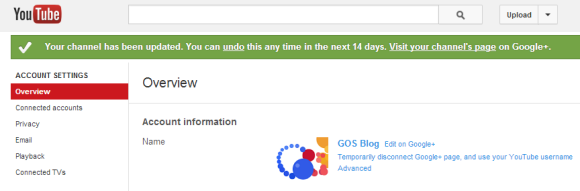
You have 14 days to change your mind. Just click "Temporarily disconnect Google+ page/profile, and use your YouTube username" in the account settings page.


What are the changes? Your channel will use the name and photos from your Google+ profile/page, it will link to the profile/page and you'll also see Google+ notifications and links in the YouTube navigation bar.

You can also create multiple channels. Use this page or click "switch account" in the navigation bar to switch to a different channel or create a new one. Each new YouTube channel comes with a Google+ page.