Showing posts with label Easter Egg. Show all posts

Google's Animated Decorations for Christmas

Last month, I mentioned that Google's search results pages got some special decorations when searching for [Hanukkah] and [Festivus]. Nothing for Christmas? Todd Kuk, a reader of this blog, says he noticed an animated image when searching for [Christmas], [A Christmas carol] and other queries that include "Christmas". I tried these queries, but I don't see the ornaments.


The animated GIFs:


Todd also recorded this video:


Here are the decorations from 2011 and from 2012.

{ Thanks, Todd. }

Google's Festive Decorations

Google shows a lot of festive doodles, Easter Eggs and special decoration. Here are some of them:

- The Thanksgiving doodle is actually a video


Here's the video:


"Thanksgiving Day is a national holiday celebrated primarily in the United States and Canada as a day of giving thanks for the blessing of the harvest and of the preceding year."

- Mr. Jingles is hungry


Here's the animation:


- Hanukkah search results


Here's the mobile Safari version:


... and the mobile Chrome version:


"Hanukkah, also known as the Festival of Lights and Feast of Dedication, is an eight-day Jewish holiday."

- Festivus search results include the aluminum Festivus pole


"Festivus, a well-celebrated parody, has become a secular holiday celebrated on December 23 which serves as an alternative to participating in the pressures and commercialism of the Christmas and holiday season. Originally a family tradition of a scriptwriter working on the American sitcom Seinfeld, the holiday entered popular culture after it was made the focus of a 1997 episode of the program."

As Google says, "it's all about Thanksgivukkah in 2013. This overlap of Thanksgiving and Hanukkah won't happen again for another 70,000+ years, making it a once-in-a-lifetime event".

Happy Thanksgiving! Happy Hanukkah! Happy Holidays!

{ Thanks, Mukil, Emanuele, Camilo and Florian. }

YouTube Easter Egg for Doge Meme

"Doge is a slang term for 'dog' that is primarily associated with pictures of Shiba Inus (nicknamed 'Shibe') and internal monologue captions on Tumblr. These photos may be photoshopped to change the dog's face or captioned with interior monologues in Comic Sans font," informs KnowYourMeme.

YouTube has an Easter Egg that changes the search results page for [doge meme]: colorful text, Comic Sans, much wow, so hip, help plz.


{ via Phandroid, thanks Sushubh }

Google+ Easter Egg for Halloween

Google+ notifications have a special interface for Halloween. Mr. Jingles looks scary and there's a funny animation that's displayed when you click the Google+ mascot. To see Jingles, you first need to mark as read all the notifications.


Here's the GIF animation, now with infinite loop:

Halloween Easter Eggs in Google Knowledge Graph

Google's Knowledge Graph cards for searches like [zombie], [mummy], [skeleton], [witch], [vampire] or [ghost] include some Easter Eggs. For ghosts, Google informs users that the food source is "air, your fear, being remembered", you can avoid them by "burning sage; not building a pool on burial grounds; staying away from haunted places" and you can defeat them by "calling Peter Venkman and Ray Stantz" from Ghostbusters.


You can avoid skeletons by "staying away from catacombs and science classrooms" and skeletons have the following subgrouping "dem bones, dem bones, dem dry bones".


To avoid zombies, "don't join a dance troupe led by a man in a red leather suit; stay out of graveyards".


Mummies use "the power of love (and curses)". Google's advice: "don't raid tombs; never read ancient scrolls" if you want to avoid them.


Vampires have only one food source: "your blood". To avoid them, "don't invite them in, keep garlic on stock, stay away from Transylvania".


Witches are easy to avoid: "don't eat red apples from strangers; hide if you see a flock of flying monkeys".


{ via Search Engine Land }

Google Maps Easter Egg for Philadelphia

Here's a cool Easter Egg: search for Philadelphia, click the map thumbnail from the right sidebar and notice that your query is replaced by "city of brotherly love", one of the nicknames of the city. "Popular nicknames for Philadelphia are Philly and The City of Brotherly Love, the latter of which comes from the literal meaning of the city's name in Greek," informs Wikipedia.


{ Thanks, Emanuele. }

Google's 15th Birthday Easter Egg

Search Google for [Google in 1998] and you'll see a search results page from 1998, the year when Google was incorporated as a privately held company. It's an Easter Egg that reminds you how much Google has evolved, while preserving a simple user interface.

The old search results includes the original Google logo that had an exclamation mark just like Yahoo!, GoogleScout - another name for the feature that returns similar pages, a drop-down that lets you pick the number of results per page, search within results, the size of the cached pages and a list of links to other search engines. All the search results link to the Wayback Machine, since most of them no longer exist.


Google's birthday is in September, but the date has changed over the years. "Google opened its doors in September 1998. The exact date when we celebrate our birthday has moved around over the years, depending on when people feel like having cake," mentioned a Google page. Google has usually celebrated its birthday on September 27 and this year is special: Google is 15 years old. Happy birthday, Google!


{ via Search Engine Land }

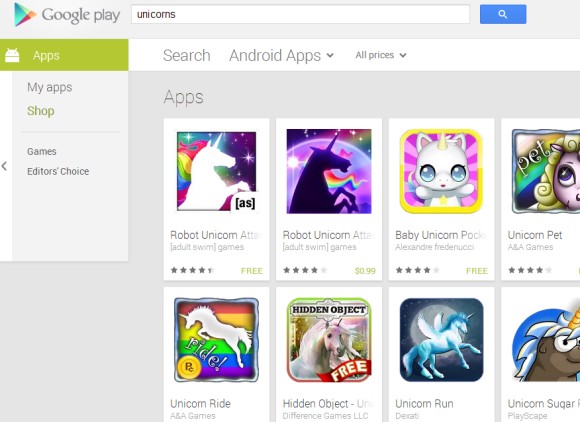
Google Play's Unicorns Easter Egg

Google Play has a cool Easter Egg: click the search button without entering a query and you'll get results for "unicorns". This works for books, music, movies, magazines, apps and even devices.


{ Thanks, D4Ni. }

YouTube's Cat Easter Egg

YouTube's app for iOS has also been updated and added many of the features from the Android app. You can watch a video while searching for the next one, just like picture-in-picture, search for playlists and use the "play all" button.


There's something that only works in the iOS app for iPad: an Easter Egg. Open the YouTube app (make sure you have the latest version - 2.0), keep a finger on the left sidebar and use another finger to swipe right until the list of videos because almost empty. You'll see a funny cat with a play button.


{ Thanks, Jonah and Max. }